


TikTok Shop Seller Center
4.31.66K Reviews
App Specs
- Version
- 11.4.1
- Updated On
- License
- Free
- Downloads
- 50,000,000+
- Developer
- TikTok Pte. Ltd.
- Categories
- Shopping
- Platform
- Android, iOS
Screenshots
 Analysis by AppCompare
What makes a seller app useful to me is not a long list of controls; it’s whether I can keep a shop moving while I’m away from a desk. That’s the promise I see in TikTok Shop Seller Center: it brings the basic work of selling into a phone-based workflow, tied to the TikTok audience where products can be discovered through content. I’d think of it less as a replacement for every part of running a business and more as a practical companion for sellers who want to manage their shop from the same device they use to make and watch videos.
The distinction matters. A conventional online storefront usually asks shoppers to search for an item or arrive with a purchase in mind. TikTok’s shopping context can begin with a video that catches someone’s attention, so the seller’s job is not only to list a product but also to make its use and appeal easy to understand. That can be a real advantage for items that are visual, demonstrable, or naturally suited to a short explanation. It is less compelling if your products need a complex consultation before a customer can decide.
A shop-management tool built around the phone
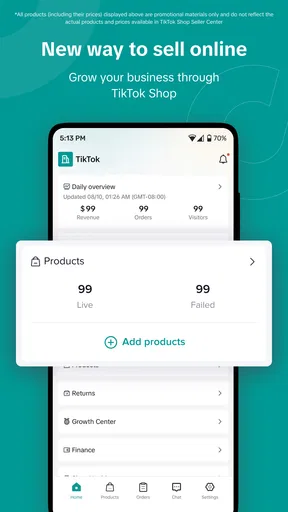
The app is a free shopping tool from TikTok Pte. Ltd., aimed at people selling through TikTok rather than shoppers browsing for their next purchase. Its store summary points to the central idea: sellers can handle shop work from a phone. That focus gives it a different role from the main TikTok experience. The social app is where you create and consume content; the seller app is meant to help you look after the business side that follows interest in a product.
I’d approach that separation as useful, not inconvenient. Keeping listing and order tasks in a seller-focused app can make it easier to switch from making content to checking what needs attention. At the same time, anyone expecting a complete, hands-off shop will need to adjust their expectations: a mobile tool can make routine actions more accessible, but it doesn’t remove the decisions behind pricing, clear product information, packing, customer care, and keeping stock details accurate.
How the mobile workflow fits a real day
Imagine a small seller who has a few products ready to ship and spends part of the day filming demonstrations. After posting, they can turn to the seller workflow to review their listings and keep an eye on incoming orders instead of waiting to get back to a computer. That is the practical benefit I’d value most: it can make a quick check feel manageable during a normal day, rather than turning every small shop task into a separate office session.
The best habit is to use the phone for short, deliberate checks, not to make every business decision in a rush. Before adding a product, I’d prepare the photos, description, price, and stock information so that entering the listing is a tidy task rather than a scramble. After content goes live, I’d check orders at a planned time and make sure the listing still reflects what I can actually supply. This simple routine helps prevent the common mismatch between an appealing post and a shop page that leaves basic questions unanswered.
What it does well—and where it needs patience
I’d use this section to weigh the app’s phone-first convenience against the attention it takes to keep listings and shop tasks organized. The most useful way to judge that trade-off is to look at when a quick mobile check is enough—and when a larger screen or a more search-focused selling channel would make the work easier.
Worth Reading Before You Choose

Flipboard Shows What News Apps Must Do Beyond the Feed

Switching to Android Auto Means Rethinking Your Driving Routine

Google Calendar Makes a Crowded Week Easier to Manage

Ludo King Makes the Most of the Minutes Between Plans

Baby Panda World Brings Quick Play to Modern Phones, but Its Game Library Feels Busy

ESPN’s Live Game View Makes Following Close Games Easier
Connecting content with commerce
The distinctive opportunity is the link between product discovery and TikTok content. A seller can make a product easier to understand by showing it in use, then manage the shop through the seller app. That pairing feels more natural for a handmade item, a styling accessory, or a small household product that benefits from a demonstration than for a product whose appeal depends on lengthy technical comparisons. I would treat content as a way to give shoppers context, not as a substitute for accurate listing details.
It also helps to separate attention from dependable demand. A video may reach people who were not actively shopping, but curiosity does not automatically mean a completed order. I’d use the app to stay on top of shop activity while judging content by whether it brings the right kind of customer, not simply by how much attention it appears to attract. For a small seller, that distinction can prevent a burst of views from being mistaken for a stable sales plan.
Where the experience can feel less smooth
My main reservation is that a phone-first workflow can become awkward as the amount of shop work grows. A small catalogue and occasional orders are easy to picture on a mobile screen; reviewing many products or making repeated changes is a different job. I would keep product descriptions and stock notes organized outside the moment of editing, so I’m not trying to remember details while tapping through a listing. For substantial catalogue work, a larger screen may simply be more comfortable.
There is also a learning curve in shifting between creative work and operational work. Making a compelling video and keeping a shop accurate are related, but they require different attention. If I were selling, I’d set aside a regular moment for order checks and listing upkeep rather than letting notifications dictate the whole day. That keeps the app useful as a control point instead of allowing it to interrupt every other task.
Who should give it a try
TikTok Shop Seller Center makes the most sense for a seller who already wants to reach people through TikTok and is comfortable using a phone as part of daily shop management. It may suit makers, small brands, and sellers with products that are easy to show in a video. If your business depends on a highly detailed catalogue, extensive desktop administration, or customers who need careful research before buying, I would compare the workflow with a conventional storefront before making it the center of your operation.
The app is free, rated for Everyone, and has an average rating of 4.3 from around 426,000 ratings, with more than 10 million installs. It was released on May 25, 2023, and version 10.7.0 requires Android 6.0 or later. Those figures suggest a widely used option, but they don’t tell me whether the selling model fits a particular shop; that depends more on the products, the audience, and how much work the seller wants to do on a phone.
Making the choice with realistic expectations
If you’re wondering whether you need to be a seasoned creator, I wouldn’t treat that as the deciding question. The more useful one is whether you can explain your product clearly and keep its shop information current. A polished video can help someone understand why an item is appealing, but it cannot compensate for an unclear description or stock details you have not checked. Sellers who enjoy showing how things work may find the format natural; sellers who prefer quiet, search-led selling may be happier with a more conventional shop as their main channel.
I’d also think about where each task belongs. Use TikTok for the story and demonstration, and use the seller app for the shop work that follows interest: reviewing listings, checking activity, and keeping orders from slipping out of view. That division is a useful mental model because it stops the social side from taking over the operational side. If a post draws attention, the next step is not simply to post more; it is to make sure the product page answers the questions a new customer is likely to have.
For someone running a small shop between other responsibilities, a realistic routine might be to prepare product details in advance, publish content when it is ready, then check the seller app during a planned break. If an order arrives, the seller can review what needs attention without waiting to sit down at a computer. I would still reserve uninterrupted time for tasks that need care, such as checking a larger set of listings or making business decisions. The phone is convenient for access, but convenience should not turn careful work into rushed work.
Compared with a standard marketplace, the appeal here is the chance for a product to be discovered through a video rather than only through a shopper’s search. The trade-off is that the seller has to think about presentation and audience, not just the listing itself. Compared with managing a shop entirely from a desktop, the phone-centered approach is easier to reach throughout the day but less comfortable for extended editing. Neither alternative is automatically better: the right choice depends on whether your products benefit from visual storytelling and whether mobile management fits your working style.
Before committing, I’d ask myself a few practical questions: Can I show the product honestly and clearly? Can I keep the listing accurate when stock changes? Am I willing to check orders as part of a routine? And does the audience I hope to reach spend time on TikTok? If the answers are mostly yes, the app is worth considering as a selling tool. If you need a storefront built around detailed browsing, or you do not want social content to be part of how customers find you, it may be better as a secondary channel—or not the right fit.
My take
Hey there! So, I’ve been diving into the world of e-commerce apps lately, and I stumbled across something super interesting: the TikTok Shop Seller Center. If you’re thinking about selling products and want to tap into the vibrant TikTok community, this app might just be your ticket to success. Let’s break down what makes it tick, shall we?
First things first, setting up your account is a breeze. I was pleasantly surprised by how user-friendly the process was. You just download the app, link your TikTok account, and follow the onboarding steps. It’s as simple as posting your first TikTok video. The app guides you through setting up your shop, adding products, and managing your inventory. You could say it’s like having your own little online store inside TikTok.
Features That Shine
Once you’re in, the seller app offers some pretty nifty features. Let’s dive into what stood out to me:
- Product Management: Adding products is straightforward. You can upload photos, set prices, and write descriptions. The interface is clean and intuitive, making it easy even for first-timers.
- Analytics Dashboard: This is a game-changer. The app provides detailed insights into your sales performance, customer demographics, and even the engagement levels of your posts. It’s like having a personal business analyst in your pocket.
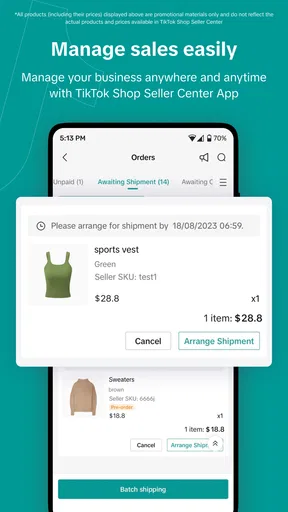
- Order Management: Keeping track of orders is hassle-free. You get notified about new orders, and you can update the order status with just a few taps. It’s all about efficiency here.
Engaging with the TikTok Community
One of the coolest things about using this app is how seamlessly it integrates with the TikTok platform. You can easily promote your products by creating engaging videos. The app encourages creativity, so feel free to get quirky with your marketing. Plus, the algorithm can work wonders in getting your content seen by the right audience. It’s kind of like having a direct line to your potential customers.
Navigating the Challenges
Now, no app is perfect, right? While the app has a lot going for it, there are a few areas where it could improve. For instance, I noticed that the app occasionally lags, especially when managing a large inventory. It’s not a deal-breaker, but something to keep in mind if you’re planning to scale up your store.
Also, the payment integration could be smoother. Setting up payment gateways might require a bit of fiddling, especially if you’re not tech-savvy. But hey, once it’s done, you’re all set to start raking in those sales!
So, there you have it! The seller app is a robust tool for budding entrepreneurs looking to make a splash in the e-commerce scene. It’s a platform that combines the best of social media engagement with straightforward online selling capabilities. If you’re already a TikTok aficionado, this app could be your next big thing.
Whether you’re selling handmade crafts, trendy apparel, or niche gadgets, this platform gives you the tools to succeed while keeping you connected to the TikTok community. Just remember, the key to success here is engagement and creativity. So, get those creative juices flowing and start building your brand!
Pros
- User-friendly interface for sellers.
- Integrated with TikTok for easy promotion.
- Efficient order management system.
- Comprehensive analytics for sales insights.
- Supports multiple payment methods.
Cons
- Limited customization for storefronts.
- Requires active TikTok account to use.
- Customer support can be slow.
- Complex setup for new users.
- Limited to certain regions or markets.
FAQs for TikTok Shop Seller Center
What is TikTok Shop Seller Center?
TikTok Shop Seller Center is a platform designed for sellers to manage their online stores within TikTok. It allows users to list products, handle orders, and engage with customers directly through the TikTok app, streamlining the process of e-commerce on a highly popular social media platform.
How do I set up a store on TikTok Shop Seller Center?
To set up a store, you need to create a seller account on TikTok Shop Seller Center. Once registered, you'll be guided through steps to list your products, set prices, and manage inventory. Ensure you comply with TikTok's guidelines to avoid any disruptions in your selling process.
What are the fees for using TikTok Shop Seller Center?
TikTok Shop Seller Center may involve various fees, including transaction fees, commission on sales, and potential advertising costs. It's important to review TikTok's official fee structure, which can vary depending on your region and the types of products you sell.
How can I promote my products on TikTok Shop?
Promotion can be done through engaging videos, collaborations with influencers, and utilizing TikTok's advertising tools. Creating captivating content and using targeted ads can increase visibility and reach your intended audience, driving more traffic to your store.
What support is available for sellers on TikTok Shop Seller Center?
TikTok offers support through various channels, including help centers, community forums, and direct customer service. Additionally, sellers can access tutorials and resources within the Seller Center to optimize their store performance and troubleshoot common issues.


